Electrical drawings and RGIE dossiers for installers

100% free until 31 December 2026 Valid VAT number No credit card Windows, Mac, iPad, Android tablet

Plans, single-line diagrams and RGIE dossier from one drawing

You survey the installation on site and draw it once: ES Schémas produces the layout plans, the single-line diagrams, the RGIE checks and the PDF dossier from it. A change carries through to every sheet.

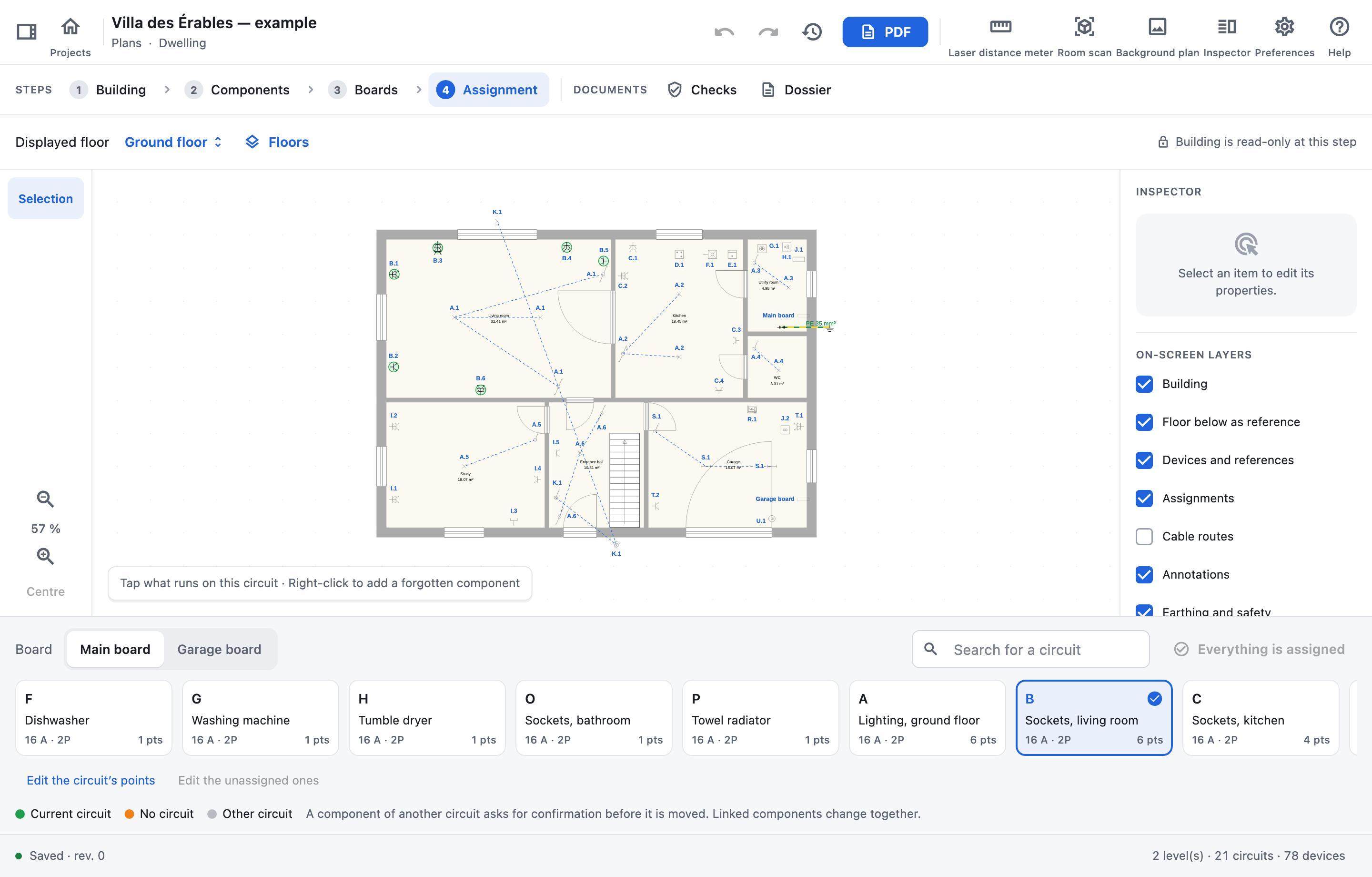
Villa des Érables · Assignment
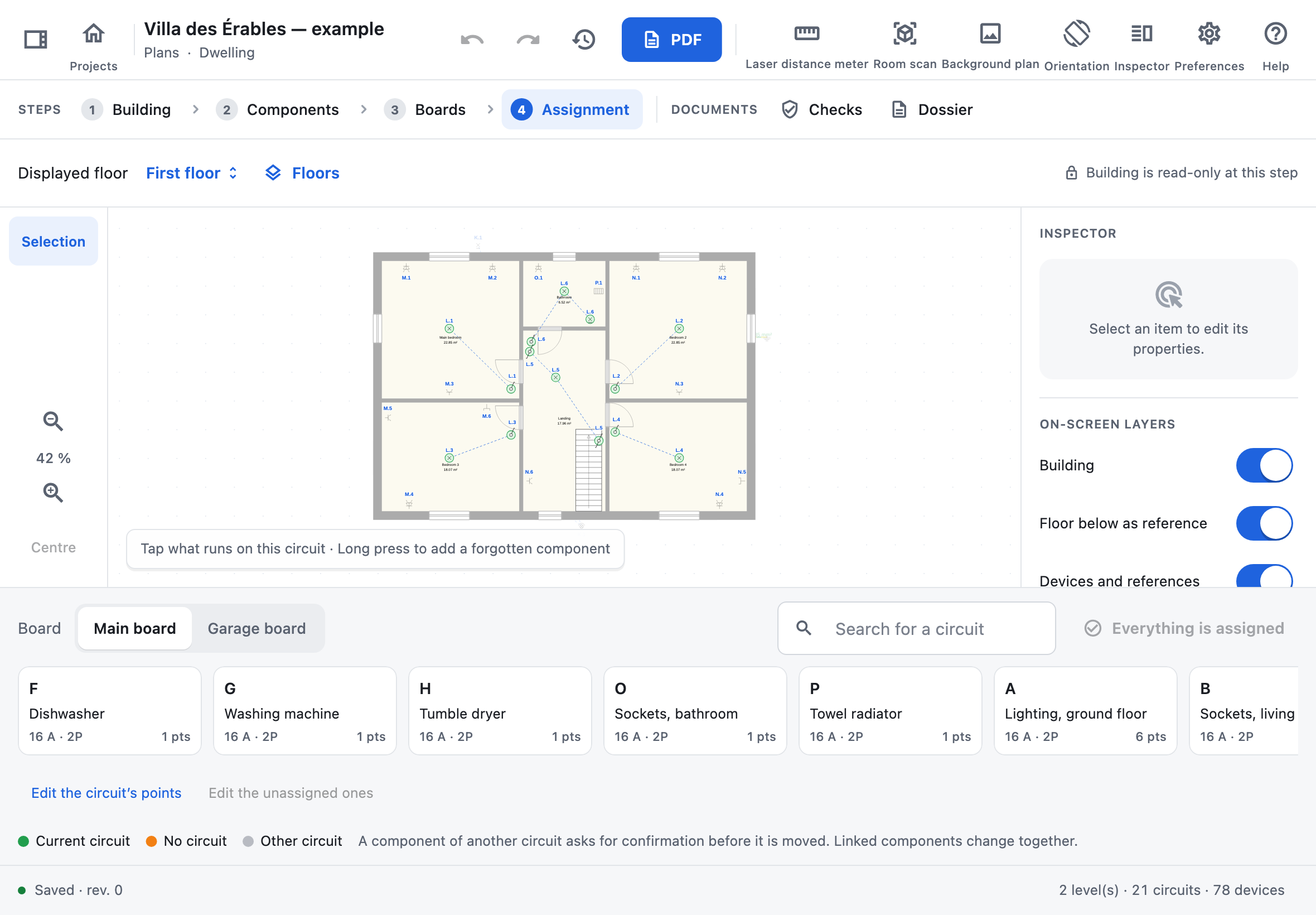
ES Schémas at the Assignment step: the ground floor of the Villa des Érables, the living-room socket circuit in green, and the main board’s circuits below.
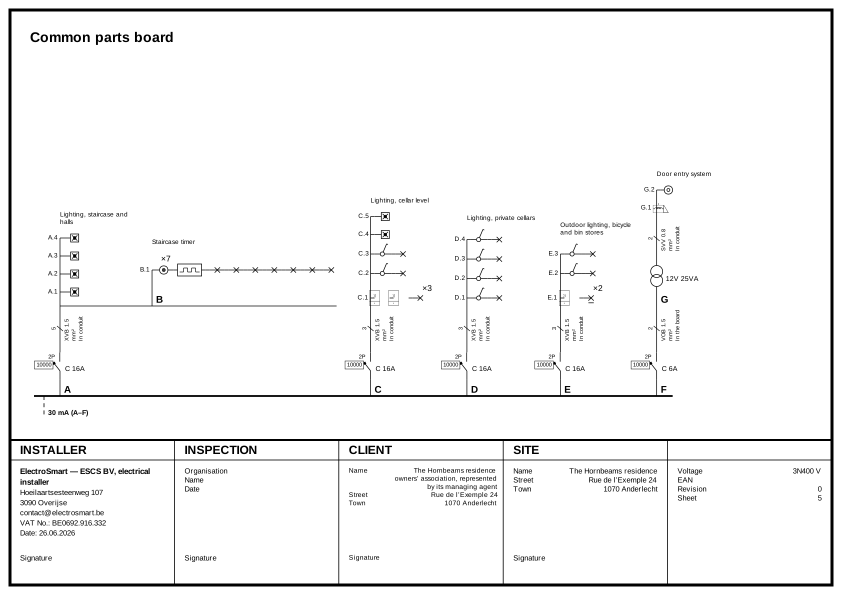
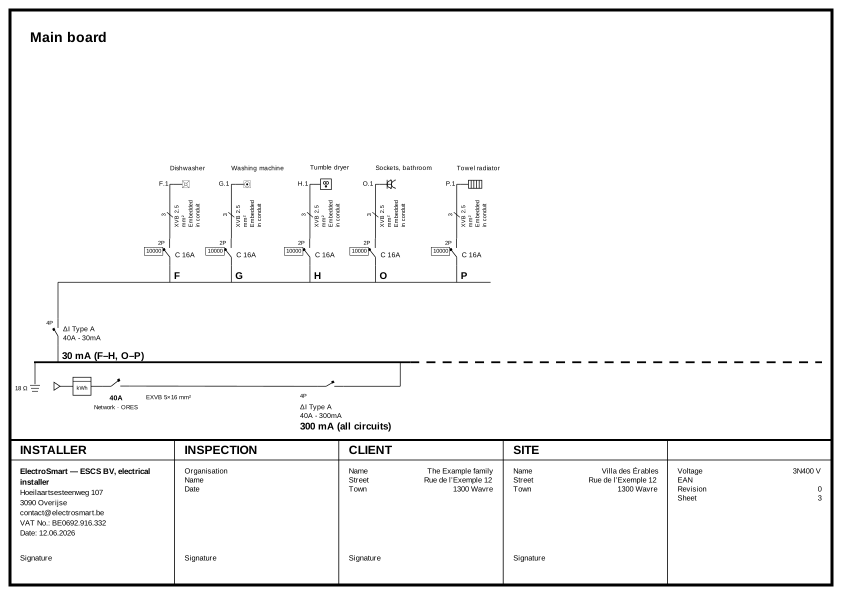
PDF · Single-line diagram Single-line diagram of the main board of the Villa des Érables, generated by ES Schémas.
AREI/RGIE Book 1Each finding cites its clause
4 platformsWindows, Mac, iPad, Android tablet
OfflineOn site, up to 7 days with no network
Designed by an electricianSerkan Eryilmaz, ElectroSmart (Overijse)

Why ES Schémas

Less office work

The survey, the drawing, the RGIE checks and the dossier for the approved inspection body are all done in the same software. Nothing is copied from one program to another.

Plans and diagrams

The documents come from the drawing

You draw the building, place the components and put the boards together; the layout plans, single-line diagrams and board layouts are produced from that. When you change a circuit, every document is updated, and the plan always matches the single-line diagram.
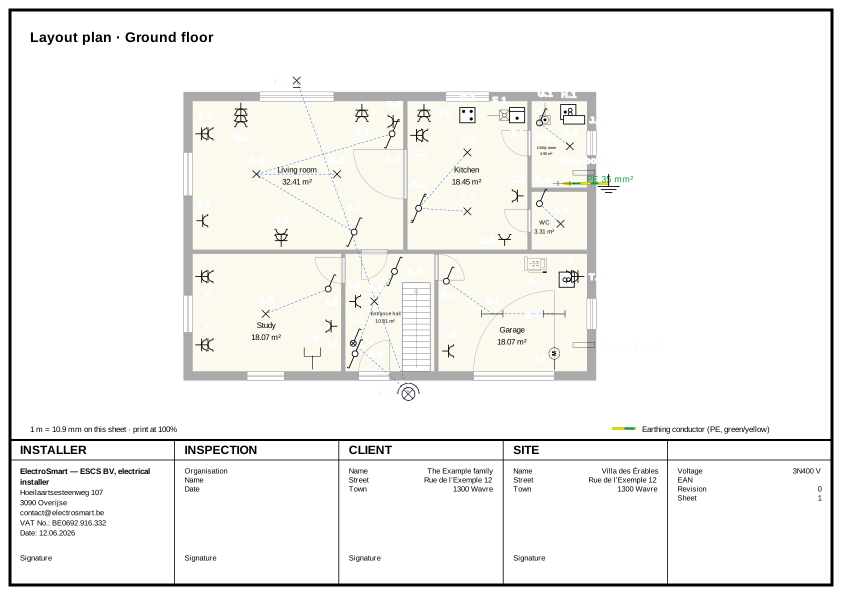
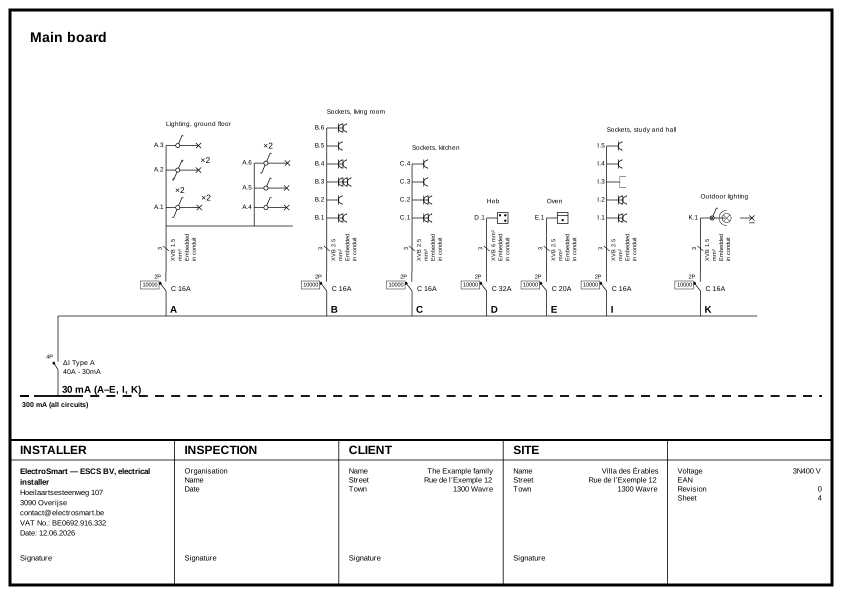
See a complete dossier

Layout plan of the ground floor of the Villa des Érables, with the circuit references.
Single-line diagram of the same project.

On site

Survey and circuit assignment on site

Measure with a Bluetooth laser distance meter (Mac, iPad, Android tablet), scan rooms with LiDAR on the iPhone or start from a scanned architect’s plan: walls, openings and rooms go straight into the plan. To assign circuits, switch on a breaker and tap on the tablet, or click on the PC, whatever lights up.

ES Schémas on iPad: assigning the circuits of the first floor.

RGIE

The RGIE, checked while you draw

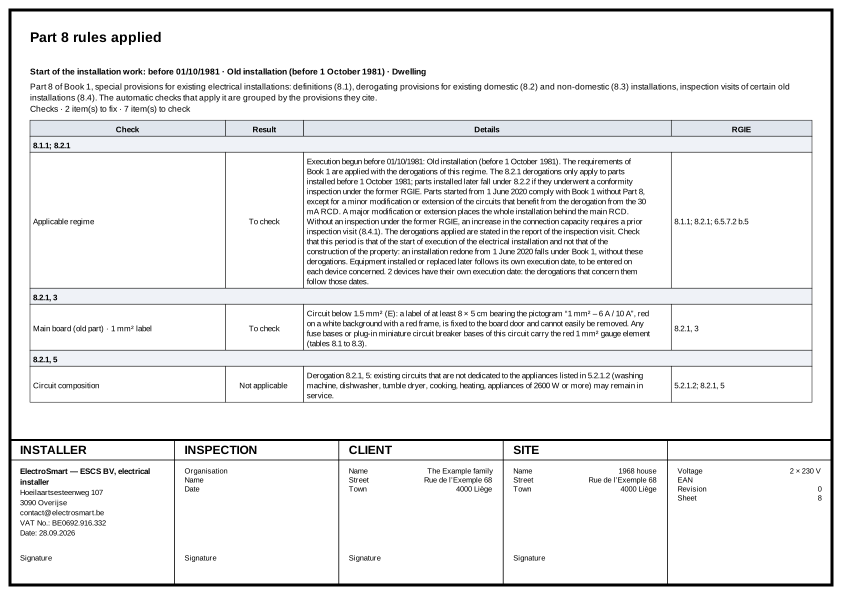
Each finding cites its clause of Book 1 and takes you to the item concerned on the plan. Derogations follow the date the installation was carried out and the date of each replaced appliance. You fix at the office what can be fixed there, and you know what remains to check on site.

See the checks of the example project

An aid to checking: it replaces neither your professional judgement nor the inspection by an approved inspection body.

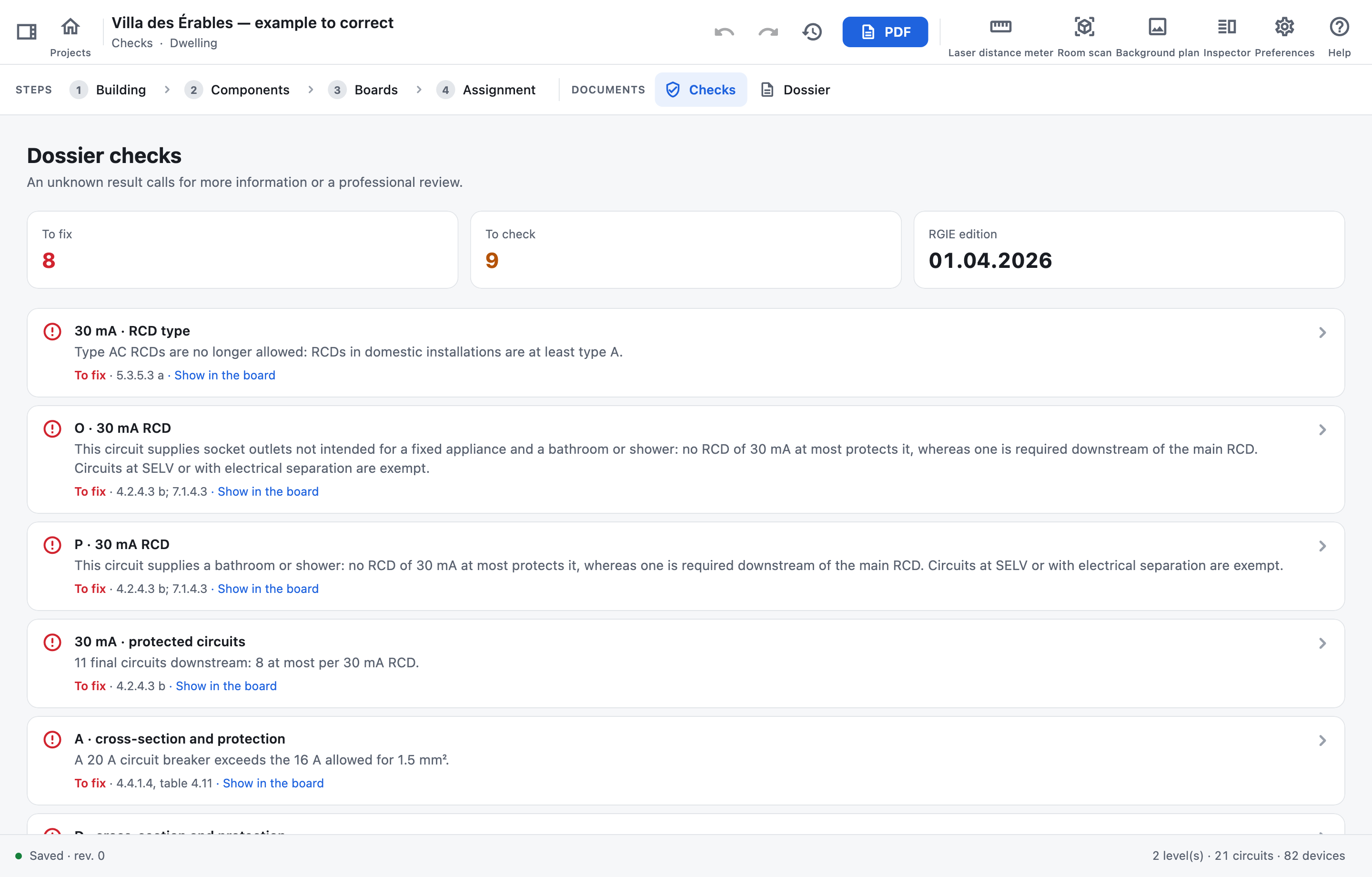
Dossier checks
The checks of a project with eight findings to correct, each with its RGIE clause.

Devices

The same projects on all your devices

The same app and the same PDF on Windows, Mac, iPad and Android tablets. Your projects sync between your devices and stay available offline; ES Schémas Mobile puts them on your phone too.

Windows
Mac
iPad
Android
ES Schémas MobileiPhone and Android

Who makes ES Schémas

ES Schémas is developed by ElectroSmart (ESCS BV), an electrical contractor in Overijse, Belgium. It was designed by Serkan Eryilmaz, a working electrician at ElectroSmart, for the situations you know: surveying an existing installation, putting a board together, assigning circuits, the visit from the approved inspection body.

Features

What the software covers

  1. Layout plans

    One plan per floor, to scale, with every circuit’s references.

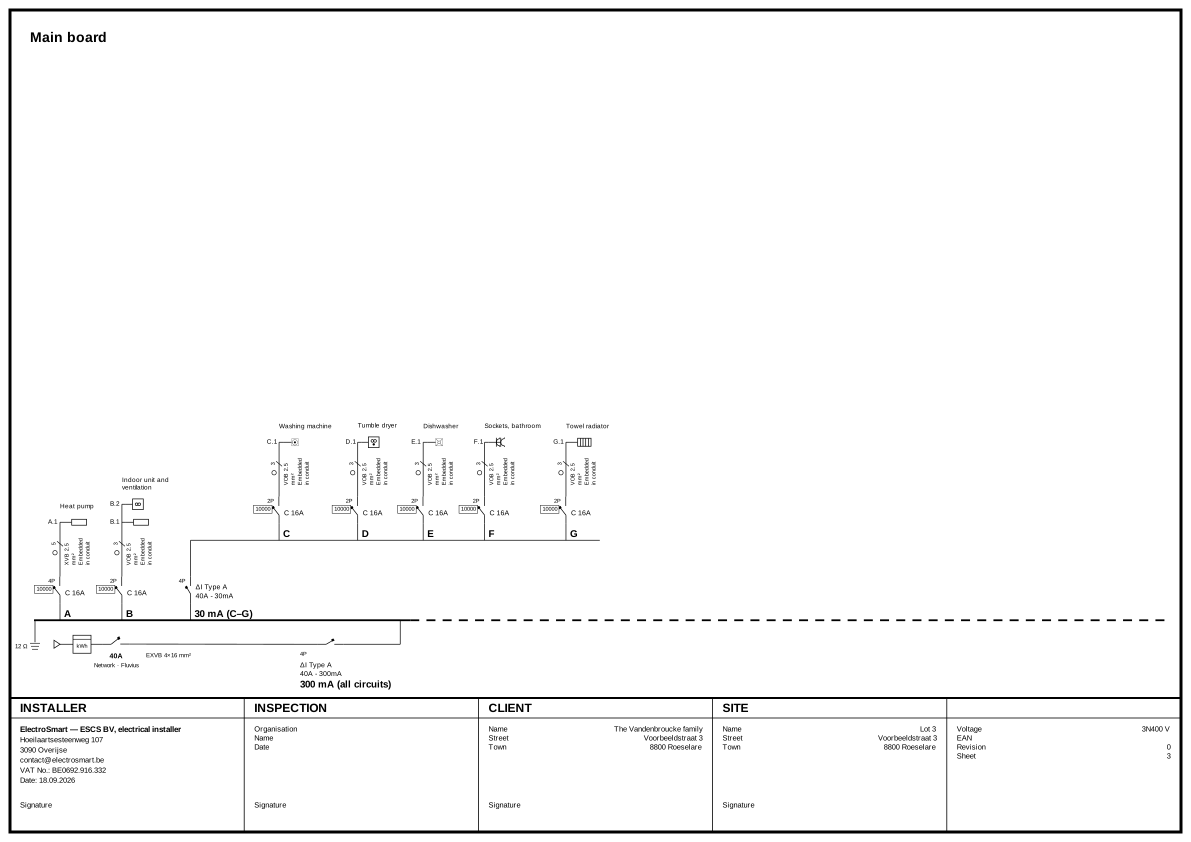
  2. Single-line diagrams

    Generated from your boards and always consistent with the plan.

  3. Boards and circuits

    RCDs, circuit breakers, fuses, sub-boards and DIN rail layout.

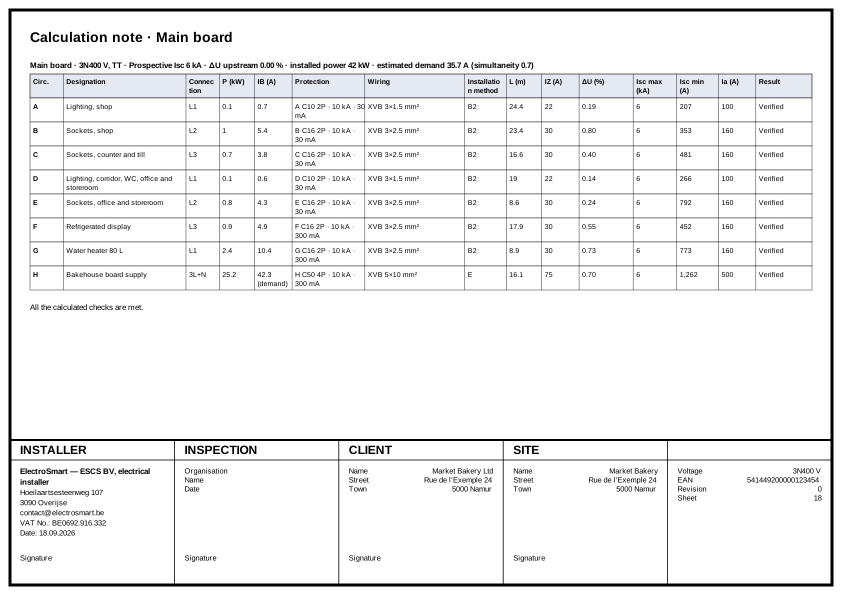
  4. Calculation note

    Tertiary projects: cross-sections, voltage drops and short circuits checked against the RGIE and good practice, with the cable length taken from the plan. Homes are checked against table 4.11.

  5. Tertiary

    External influences, escape routes and safety installations.

  6. PDF dossier

    Title block, signatures and logo, in French, Dutch or English, to print or hand to the approved inspection body.

  7. EV charger

    A project with a short workflow: the power, protections and location of chapter 7.22 on one page.

  8. Photovoltaics

    Modules laid on the aerial view, strings, inverter and battery under chapter 7.112.

  9. Board labels

    Reference strips printed at the row’s length, on Brady.

All features

How it works

A project in four steps

  1. 1

    Building

    Draw the walls, openings and floors, or import the room scan.

  2. 2

    Components

    Place sockets, light points and switches, and link the controls.

  3. 3

    Boards

    Set up the supply, the boards, the protective devices and the circuits.

  4. 4

    Assignment

    Tap on the plan whatever each circuit supplies.

Pricing

One subscription with every feature

Two devices of your choice plus your phone, updates included.

100% free until 31 December 2026

Every feature free through 31 December 2026, with at least a 30-day trial from company validation. No credit card or automatic billing.

Only for companies with a valid VAT number.

One free user per company. Additional seats follow the team prices.

After the free period

Monthly

To get started, or for your busy months.

€49excl. VAT per month

Billed monthly, no commitment.

Start your trial

Teams

Several installers of one company, on the same projects.

€49excl. VAT a month, first seat

And €19 excl. VAT a month per extra seat. Yearly: €490 for the first seat (€390 the first year, for a subscription taken by 30 January 2027) and €190 for each extra seat. One invoice for the whole team. Three seats: €87 excl. VAT a month.

Contact us

Every plan includes

  • Every feature, residential and tertiary
  • LiDAR scanning (iPhone) and laser distance meter (Mac, iPad, Android tablet) at no extra cost
  • Two devices of your choice: Windows PC, Mac, iPad or Android tablet
  • ES Schémas Mobile for iPhone and Android
  • Sync across your devices and version history
  • App updates

Subscribing. After the free period, call us, send a WhatsApp or write to us: we activate your company’s subscription. Invoice via Peppol, paid by bank transfer, SEPA direct debit, card or Bancontact.

Your projects stay yours. If you stop, they open read-only on your devices: you view them, print their PDF and export their archive.

Education licence: free for electrician courses

Learning or teaching an electrician course, at school, in an apprenticeship (IFAPME, EFP, SFPME, CEFA, Syntra), in adult education or with Forem, Bruxelles Formation or VDAB? The Education licence is free, with every feature, for learning, teaching, coursework and exams. No company number needed.

Request the Education licence

Frequently asked questions

Before you start

More questions?

Can I try ES Schémas for free?

Register your company under “Account”. After company validation, free access lasts through 31 December 2026 or the end of your 30-day trial, whichever is later, including in January. One trial per company. Only for companies with a valid VAT number. The Education licence remains a separate offer for electrician courses and educational use.

Which devices does ES Schémas run on?

Windows, Mac, iPad and Android tablets, in English, French or Dutch, with the same plans and the same PDF everywhere. ES Schémas Mobile, for iPhone and Android, keeps your projects and their dossiers on your phone.

Is the dossier RGIE-compliant?

ES Schémas follows Book 1 of the RGIE and flags, clause by clause, what needs fixing or checking. It helps you produce a complete dossier; the installation’s compliance remains your responsibility, and its inspection that of an approved inspection body.

Is a Windows PC or a Mac enough?

Yes. ES Schémas is a native app on Windows as on Mac, and everything works with keyboard and mouse: building, background plan, components, boards, circuit assignment and the PDF dossier. On a Mac, the laser distance meter works too; on Windows it is not available: type the lengths in. On either, LiDAR room scanning goes through an iPhone 12 Pro or later, and printing row labels through an iPad, an Android tablet or a phone with ES Schémas Mobile (included).

Do I need an internet connection?

Not to work: every change is saved on the device. The connection is used to sync your projects between your devices, and syncing resumes on its own when the network is back. Offline, the licence stays valid for 7 days; after that, projects open read-only until you connect briefly.

Does ES Schémas handle an EV charger or solar panels?

Yes: the “EV charger” and “Photovoltaics” project types start with the network, the main board and the dedicated circuit, and gather on one page what the RGIE asks for this work. The dossier opens with their datasheet.

Are my projects safe?

Your projects are in your private space, or in the one your team shares: nobody else sees them. Version history lets you go back, every project can be exported as an archive, and you can delete your account at any time.

What about an apartment building?

Create one project per supply point: each flat, and the common parts, whose installation type is “Common areas”. “Duplicate” copies a finished flat for the next one, a floor is created by copying the one shown, and multi-select duplicates a row of cellars or light points in columns and rows.

Does ES Schémas suit an existing installation, before the inspection of a sale for example?

Yes. Enter when the installation’s execution began, among the RGIE’s key dates (1981, 1983, 1986, 1991, 2000, 2003, 2007, 2013, 2020, 2022, 2023, 2025 and 2026): the checks apply that period’s rules and derogations, and the date of each added or replaced device. Without a date, Book 1’s current requirements apply. It is the date of execution that counts, not the building’s: an installation redone in 2015 in a 1965 house does not benefit from the derogations for old installations.

Can I take over an existing dossier, or those from my current software?

ES Schémas does not import other programs’ files: keep your old dossiers as PDFs. For the plans: lay the scanned plan or the architect’s PDF under the floor, scaled by a length you measure on site, and draw over it. Taking over an existing dossier from its scan or PDF, single-line diagrams included, is in development.

Try ES Schémas on your next job

Every feature free through 31 December 2026, with at least a 30-day trial from company validation. No credit card or automatic billing. Only for companies with a valid VAT number.